Your kid has the best game of the season. Five goals, an intercept, the kind of afternoon you actually want people to know about. And what do you do with it? You text three people “she played SO well today” and that’s it. Gone by Monday.
This isn’t a discipline problem. You’re not lazy, and you’re not the only parent standing on the sideline thinking “someone should make this look like something.” The truth is there’s never been an easy way to turn a good game into something worth sending. At least not without an hour, a laptop, and some Canva skills.
Why a good game deserves better than a group text
A scoreline in a group chat disappears in about four seconds of scrolling. It doesn’t capture what actually happened. Today she read the ball, that he backed himself for once, that the whole team lifted in the last quarter. None of that survives “3-1, good win today.”
Compare that to a photo from a wedding, a birthday, a work milestone. Those moments get a graphic, a card, something with a bit of polish, because someone decided they were worth the extra ten minutes. A great game from your kid rarely gets the same treatment, and it’s not because it matters less. It’s because nobody’s worked out how to make it easy.
What’s actually stopping parents from sharing it properly
Three things, and they’re not about motivation.
Time. You’re standing on a sideline holding a coffee, not sitting at a desk with design software open. Whatever you make has to happen in the ten minutes between full-time and the car ride home, or it doesn’t happen.
Skill. Canva templates exist, sure. They also take twenty minutes to find, resize, and fill in. Also most of them were built for birthday invites, not sport. You end up with something that looks close but not quite right, which somehow feels worse than not trying.
Access. The graphics you see from AFLW broadcasts, from college programs overseas, from the polished stuff on a club’s Instagram, that’s built by someone with a design team and licensed templates. It was never meant for a Tuesday night netball game in a suburban gym. Pro-level graphics were genuinely out of reach for a parent with a phone and five minutes.
That third one is the real gap. It’s not that parents don’t want to celebrate a good performance properly. It’s that the tools capable of doing it well have, until recently, belonged to people with a production budget.
What a decent sports graphics generator actually needs to do
It shouldn’t just add features. It should remove steps. The job is: take what actually happened in the game. The stats, the score, the moment, and turn it into something that looks intentional, in about as long as it takes to leave the car park.
That means no template hunting, no resizing, no typing scores in by hand after the fact. If a parent has to open a second app or dig up a photo to make it work, it’s already lost the ten-minute window it had to be useful.
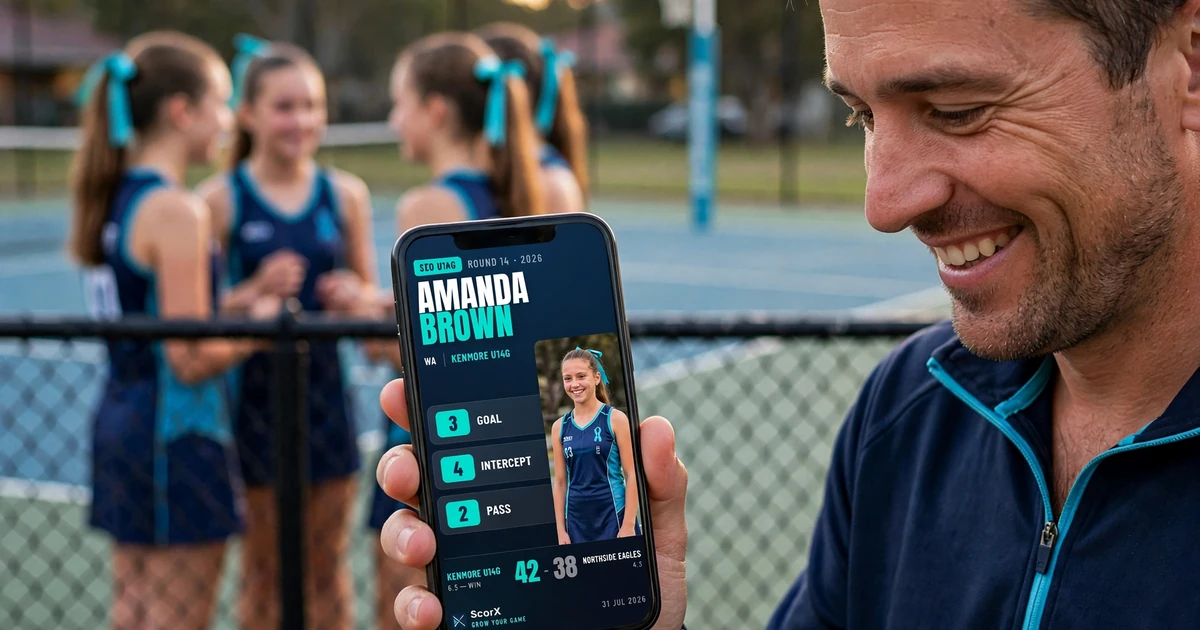
This is where ScorX earns its mention, and it’s a fair one: it was built around exactly this gap. You record the game as it happens. A tackle here, a goal there, then at full-time it turns straight into a shareable card, stats and all. No template. No app-switching. It’s the same graphic quality you’d expect from a broadcast, generated from the numbers you were already tracking from the sideline.
It doesn’t replace the group chat. It just gives the group chat something worth sending. A final-score card, a progress update mid-game, or a card built around one kid’s individual performance when that’s the story of the day.
The bit that actually matters
None of this is really about graphics. It’s about a kid finishing a genuinely good game and having something to point to afterwards that isn’t just a feeling. “You played well” fades. A card with the actual numbers on it doesn’t.
Frequently Asked Questions
How do you make a shareable sports graphic for a kid’s game?
The fastest way is an app that turns the stats you’re already tracking into a graphic automatically, rather than building one from scratch afterwards. Recording basic stats during the game, score, key moments, individual touches, means the graphic exists the second the final whistle goes, instead of requiring a separate design step later that night. Tools like Canva work if you have twenty minutes and know what you’re doing with templates, but they weren’t built for sport specifically, so you end up manually entering scores and resizing text boxes. A sports-specific graphics generator like ScorX skips that step entirely: the card is built from the live data, so it’s ready to share within seconds of the game ending, whether that’s a mid-game score update, a final result, or a card celebrating one player’s performance.
Do I need any design skill to make these look good?
No. The whole point of a purpose-built tool is that the layout, colours, and typography are already handled — you’re filling in game data, not designing a graphic.
Can I share the score as the game is happening, not just at the end?
Yes, if the app you’re using supports live tracking. That’s what makes it different from a graphic you build after the fact — you can share an update at any time as well as the final result.
Is this only useful for the kids who are already the star player?
No — that’s actually the opposite of the point. A card built from real stats gives every kid something concrete to point to, not just the ones who score. Effort, tackles, and involvement all show up, not just goals.
ScorX is free to download. Track your first game this weekend and see what your kid’s card looks like at full-time.
Related Sideline Blogs
- The Habits Coaches Notice Most in Kids Who Improve Fastest — What “getting better” actually looks like week to week, before it ever shows up in a highlight reel.
- Why Your Child’s Stats Look Different from Game to Game — Why the numbers behind a great card fluctuate, and what that actually tells you.
- Which Youth Sports Stats Actually Matter (And Which Don’t) — The stats worth building a season around, before you worry about how they look on a card.