ScorX for Coaches: Run Your Team and Plan Your Training

Scoring, match invitations, post-game triage, training plans and squad tests are free, for up to 5 teams, 25 players in total and 20 saved games. Premium lifts those limits and adds weekly AI training recommendations and voice stat recording.

What Is Free and What Is Premium

The coach dashboard is free. The weekly AI recommendations on top of it are the Premium part.

Free

ScorX Free

  • Live scoring, stats and full offline use
  • Match invitations and shared stat recording
  • Rotations and playing time
  • Post-game triage dashboard and Perception vs Reality
  • Plays, drills, Training Sessions and Run Session
  • Drill assignment and team results
  • Age and sex benchmarking
  • Squad import from a spreadsheet, such as a PlayHQ export
  • iPad Team Mode

Limits: up to 5 teams, 25 players in total and 20 saved games.

Premium

ScorX Premium

  • Weekly AI training recommendations built from your team's match data and player reflections
  • Voice stat recording (team sports, iOS 26 or later)
  • No limit on teams, players or saved games
  • Full run drill library (sprint and interval drills) and custom run drills
  • PDF and CSV export and iCloud sync

A$4.99 a month or A$49.99 a year. The 30-day free trial includes everything in Premium and needs no card. See pricing.

Team & Roster Management

Free

  • Up to 5 teams on Free — create and manage the teams you run across seasons
  • Up to 25 players in total on Free — add each player with name, jersey number, and position
  • Player profiles — date of birth, position history, and contact details per player
  • Multi-sport support — switch between AFL, basketball, netball, rugby, soccer, hockey, touch, tennis, and 6 more sports within the same team setup
  • Premium removes the team, player and saved game limits. Import your squad from a spreadsheet to set a team up faster
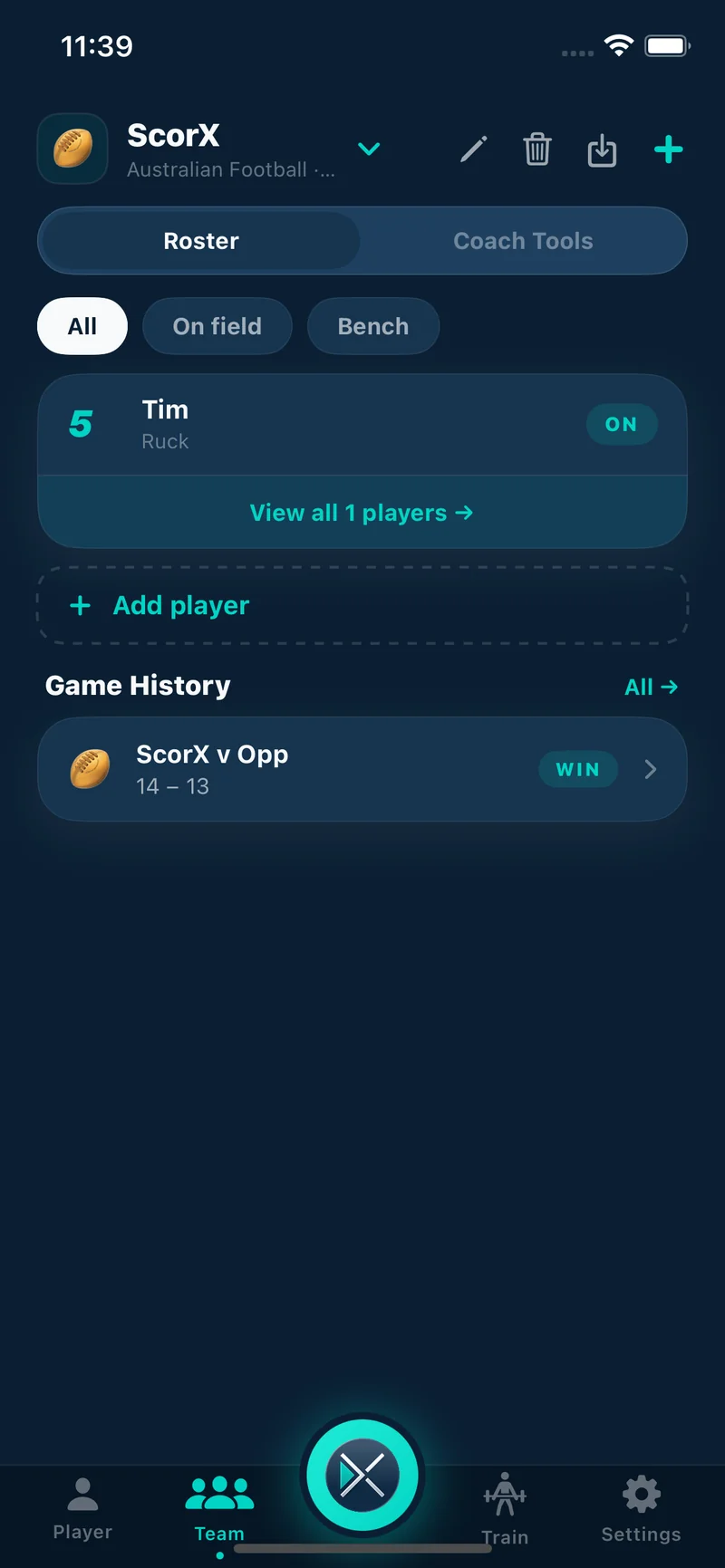
Team roster showing player list with jersey numbers and positions

Match Invitations

Free

  • Invite parents directly — send a match invitation to each player's family before game day
  • Attendance confirmation — parents confirm or decline when accepting; coaches see a real-time headcount before the game
  • Parent stat recording — parents record their own child's stats during the game; the coach sees the full team view in real time
  • Distributed recording model — turns a single-person chore into a team effort; no more one person trying to track 15 players simultaneously
  • Declining an invitation automatically cancels all game prep notifications for that match
Screenshot coming soon
Match invitations: invite status and attendance.

Game Day — Live Scoring & Stats

Free

  • Live score tracking — real-time team scores with sport-specific scoring rules (goals, tries, sets, rally points)
  • Sport-specific stat categories — AFL: goals, behinds, marks, tackles, disposals; Basketball: field goals, three-pointers, free throws, rebounds, assists; and equivalents for all 16 sports
  • 100+ configurable activities — customise which stats are tracked per sport per team
  • Activity timeline — every recorded action is timestamped, giving a minute-by-minute picture of each player's game
  • Game timer — sport-specific presets with grade-based default durations; supports quarters, halves, and sets
  • Team stats view — aggregated activity counts by player and team during and after the game
  • Works fully offline — no internet required at the ground
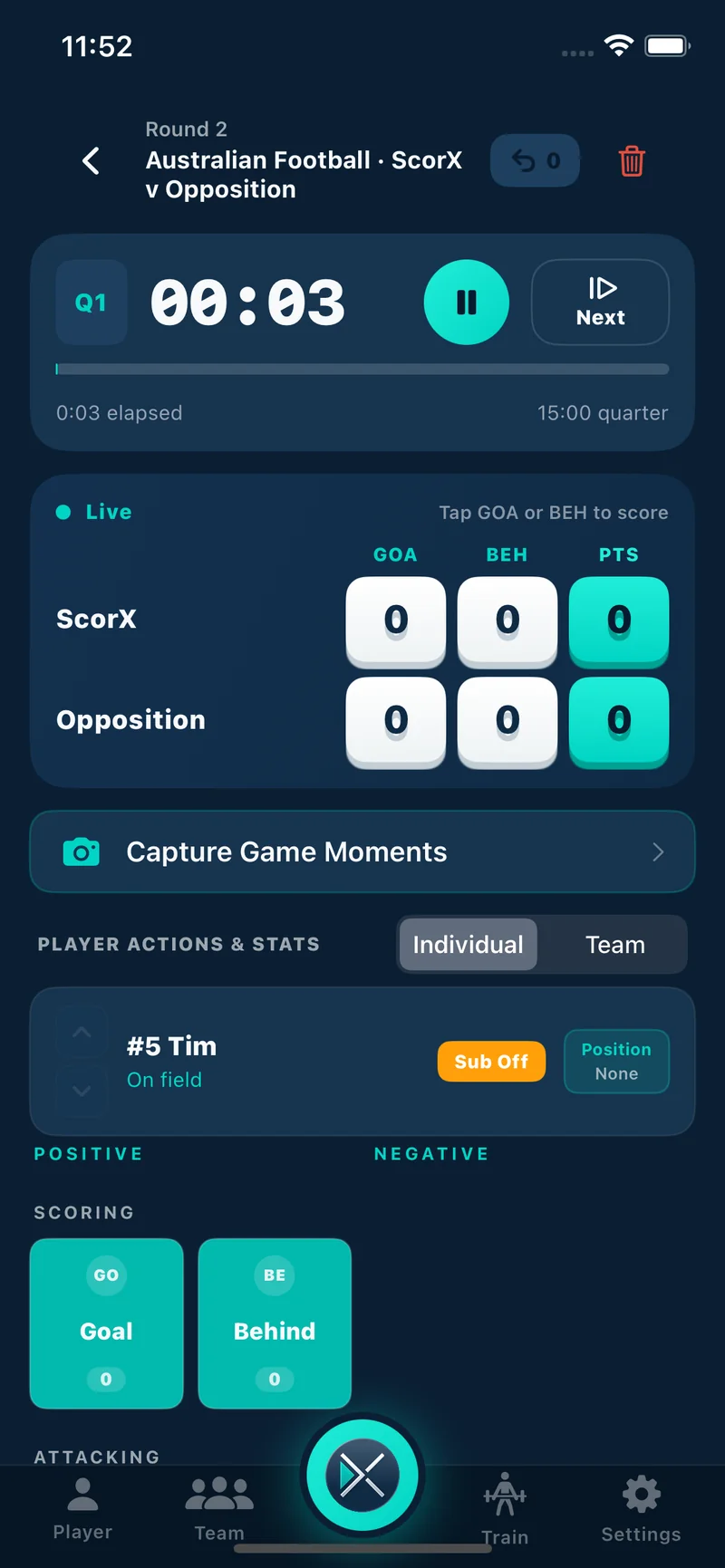
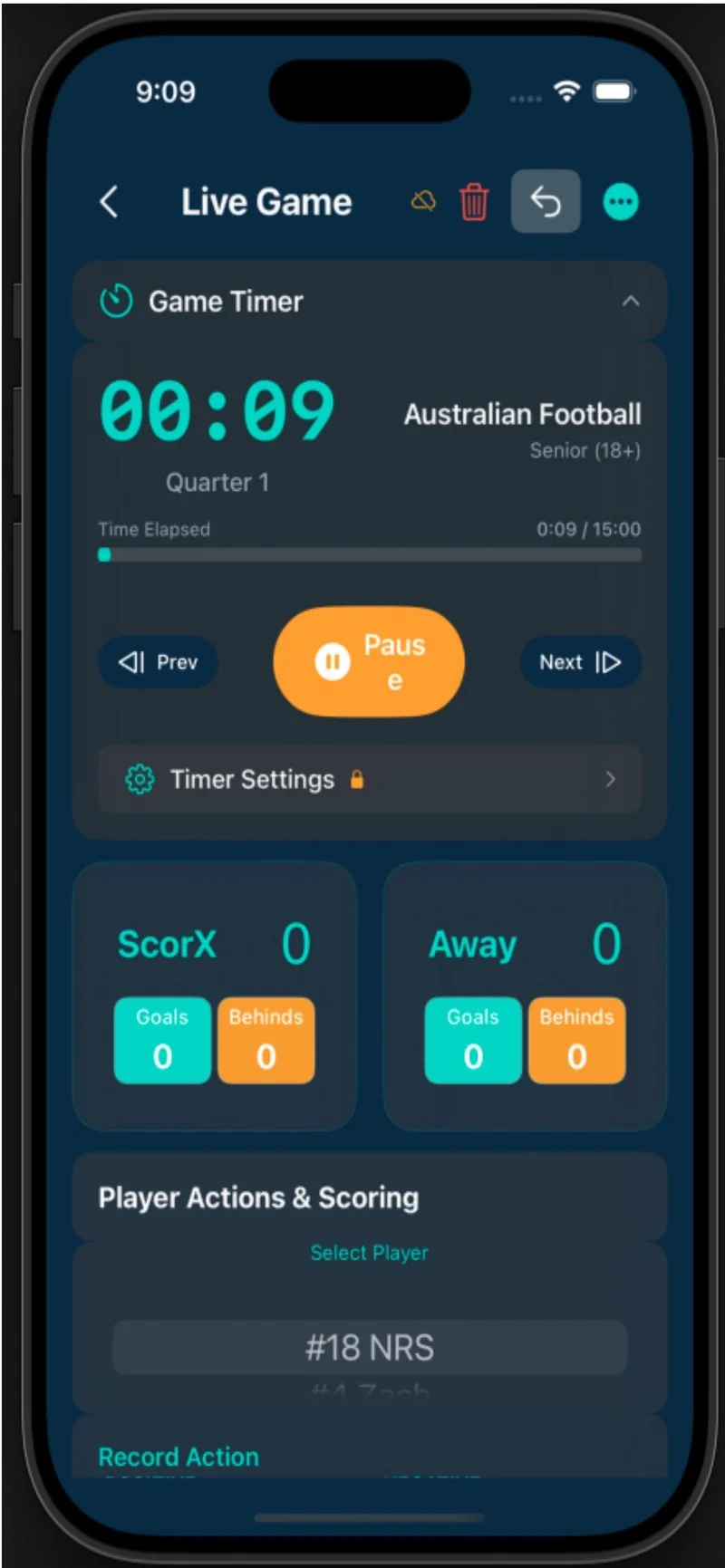
Live game scoring view showing real-time team scores and player stat totals

Player Rotations & Playing Time

Free

  • Position management — assign positions before and during the game
  • Rotation tracking — record interchange events as they happen throughout the game
  • Playing time percentages — automatic calculation of each player's time on field, interchange-aware
  • Injury and disciplinary tagging — mark the reason for a rotation: injury, rest, card, or tactical
  • Starting lineup selection — set the starting lineup before the game begins
  • Cross-reference playing time against performance stats to identify load management patterns
Screenshot coming soon
Rotations and playing time.

Post-Game Triage Dashboard

Free

  • Aggregated self-assessment data — after players submit their post-game reflections, the coach sees team-wide patterns at a glance
  • Data coverage indicator — shows how many players have submitted (e.g. "8 of 14 players submitted") so you can follow up with those who haven't
  • What to work on this week — the struggle areas your players flag most often, as a ranked list. It comes from post-game triage, not from the session planner, so it shows what players reported after the game. Build the session in Plan your training
  • Individual player flags — players with multiple struggle signals highlighted for one-on-one attention
  • Historical context — identifies whether a struggle is recurring across multiple games or first appearing this week
  • Weekly AI training recommendations Premium — an AI-generated weekly training focus based on actual match data and player self-assessments; specific to what your team did last Saturday, not generic drills
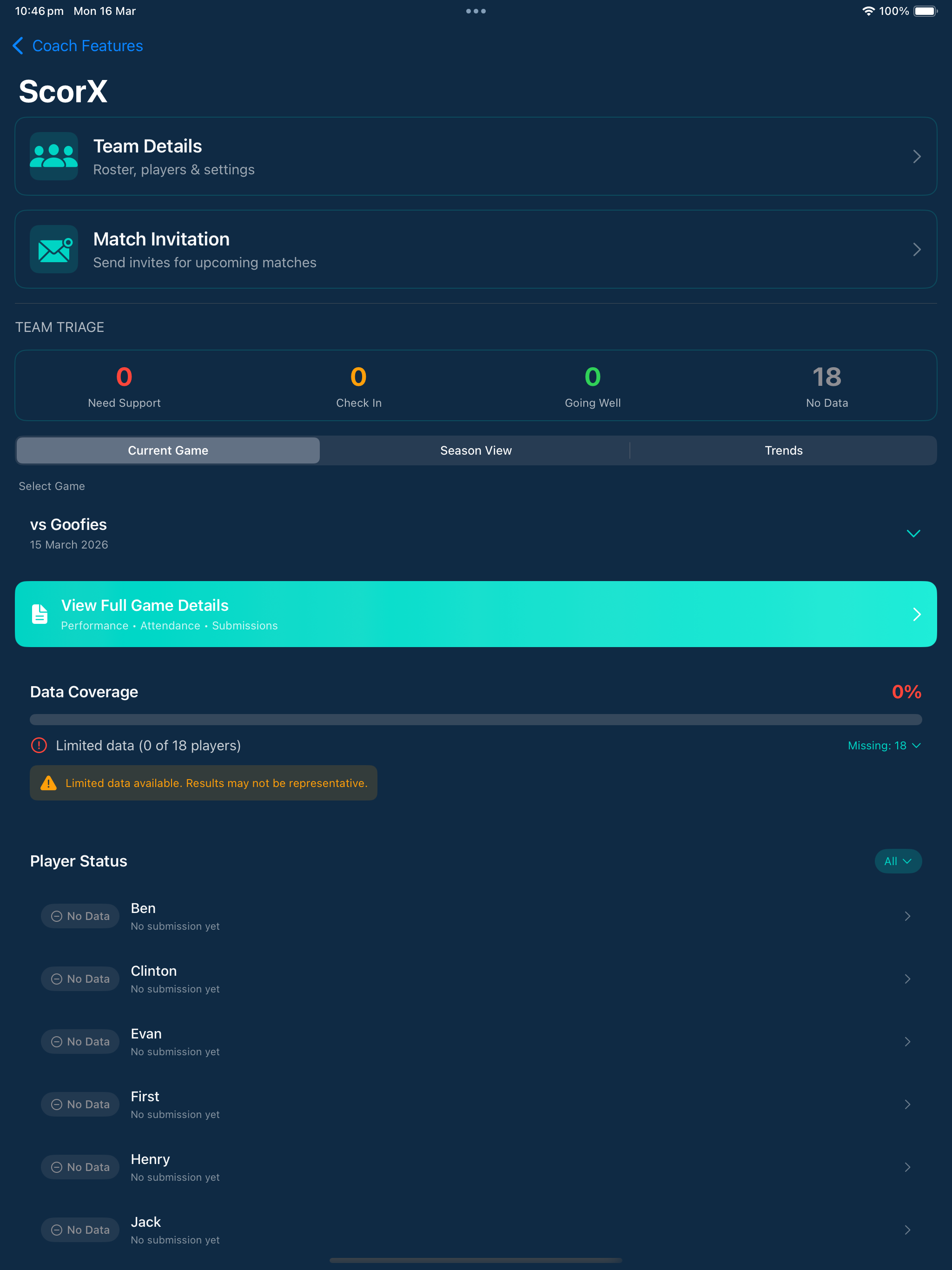
Team triage dashboard on iPad with Current Game, Season View and Trends tabs, data coverage and player status
The triage dashboard on iPad.

Perception vs Reality Analysis

Free

  • Compare each player's self-assessed performance against their actual recorded statistics
  • Identify players who overestimate their performance — a player thinks they played well but the data disagrees
  • Identify players who undervalue genuine strengths — confidence gaps that need reinforcing
  • Surface coaching blind spots — players whose struggles aren't visible from the sideline
  • Use data to lead more productive and evidence-based development conversations
  • Build athlete self-awareness as a skill alongside technical development
Screenshot coming soon
Perception vs Reality.

Plan Your Training

Plays, drills, Training Sessions and Run Session are all free, and they sit in Coach Tools in the Team tab.

Plays and Drills

Free

  • Drill Library and Drill Animator — build and animate drills (AFL drills, plus running drills for every sport), then save and import them
  • Play Library and Play Animator — build and animate plays, then save and import them
  • Favourite drills — keep the ones you reach for every week
  • Injury prevention and general programs — ready to use alongside your own drills
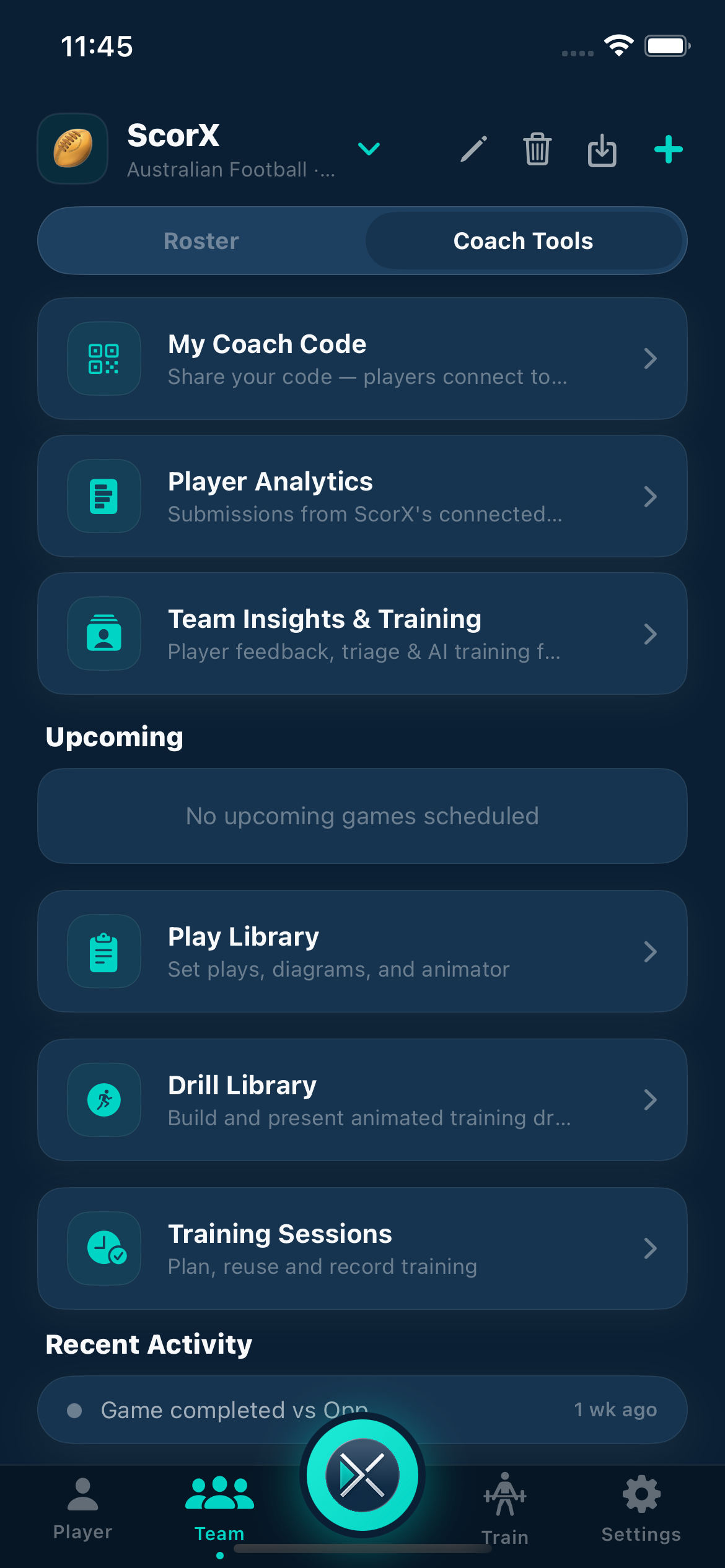
Coach Tools with My Coach Code, Player Analytics, Team Insights and Training, Play Library, Drill Library and Training Sessions
Coach Tools in the Team tab.

Training Sessions and Run Session

Free

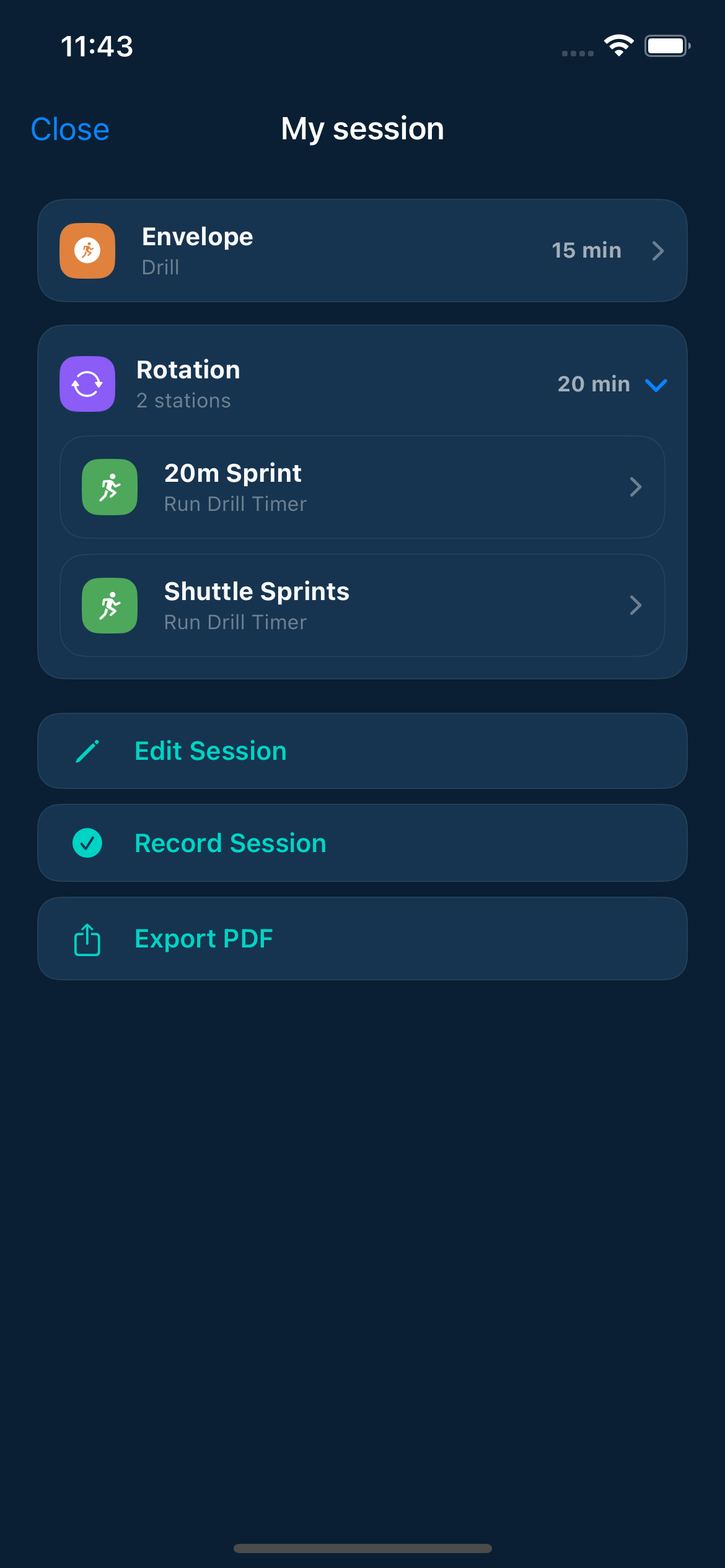
  • Training Sessions — build a session plan from your drills and rotations
  • Run Session — run the session on the day with beep pacing
  • Exporting a session as a PDF is part of ScorX Premium
My session with an Envelope drill and a Rotation of 20m sprint and shuttle sprints, plus Edit Session and Record Session buttons
A Training Session in the editor.

Test Your Squad

Free

  • Assign a drill or fitness test to your squad, then see the team results in one place
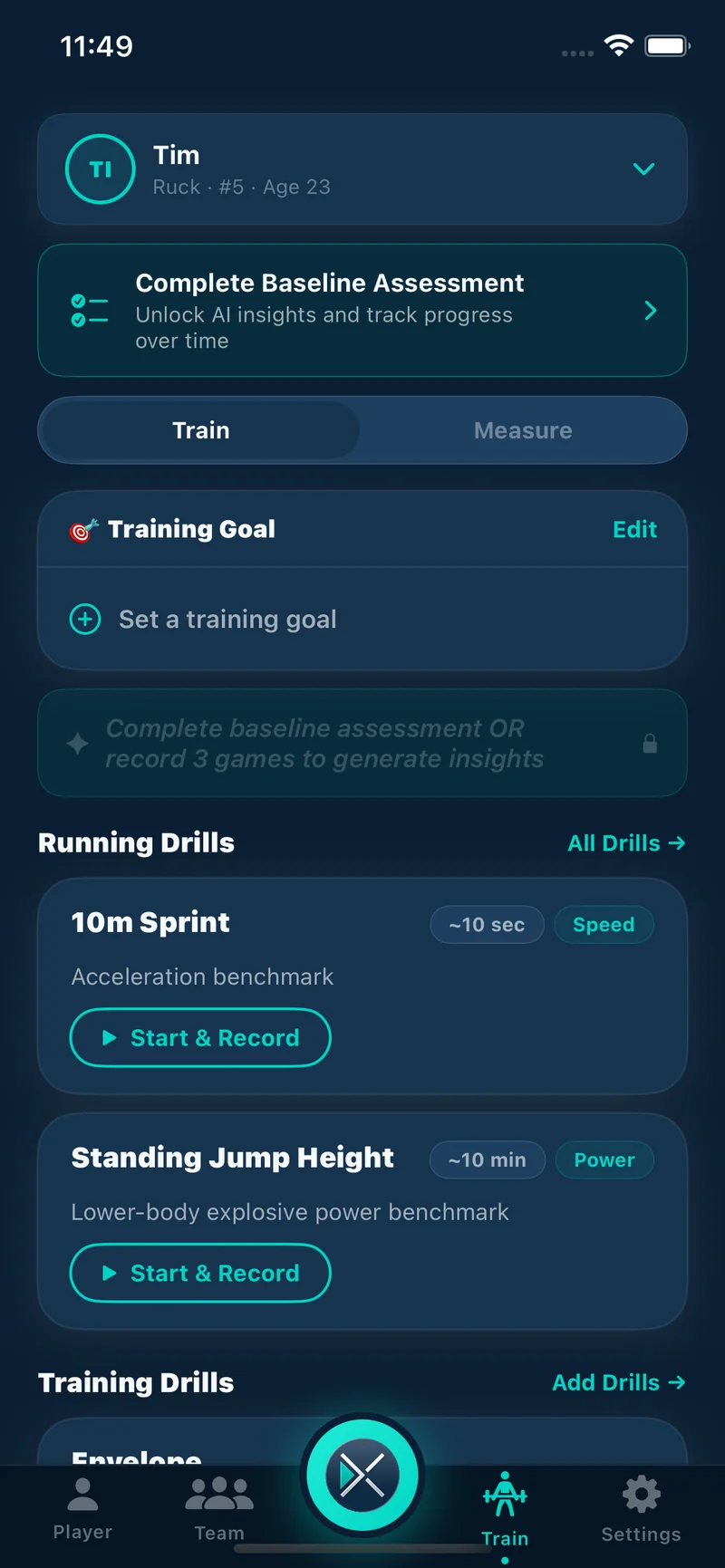
  • Run drills: the Beep Test, 800m time trial and 2km time trial are free
  • Age and sex benchmarking is free, so you can see where each player sits
  • The full run drill library (sprint and interval drills) and custom run drills are Premium
Train tab with a training goal card and running drills such as the 10m sprint and standing jump height
Run drills in the Train tab.

iPad Team Mode

A bigger screen for game-day planning, with a magnet board and lineup planning. Free.

Free
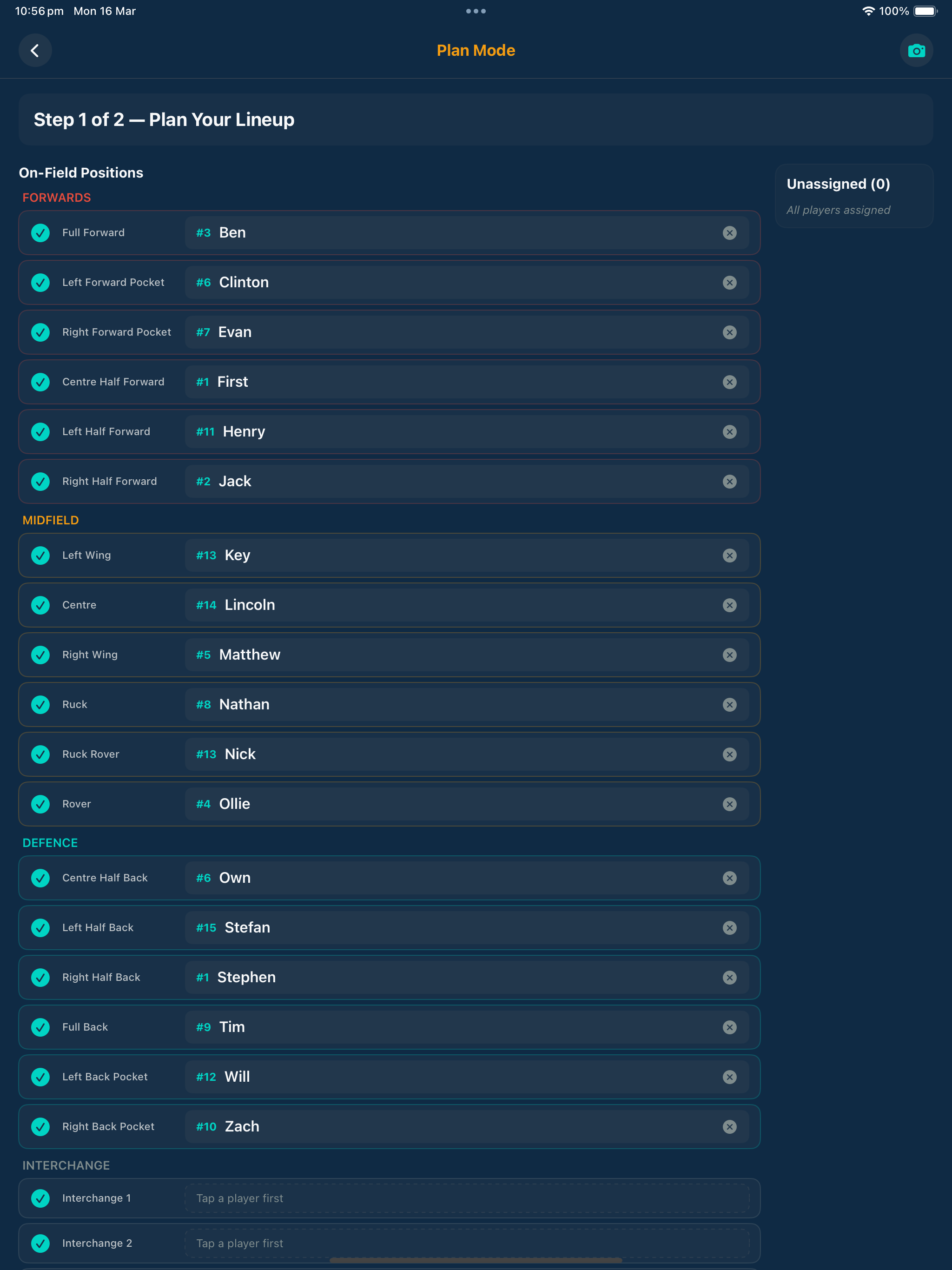
  • Plan Mode, step 1: plan your lineup, with on-field positions and the interchange
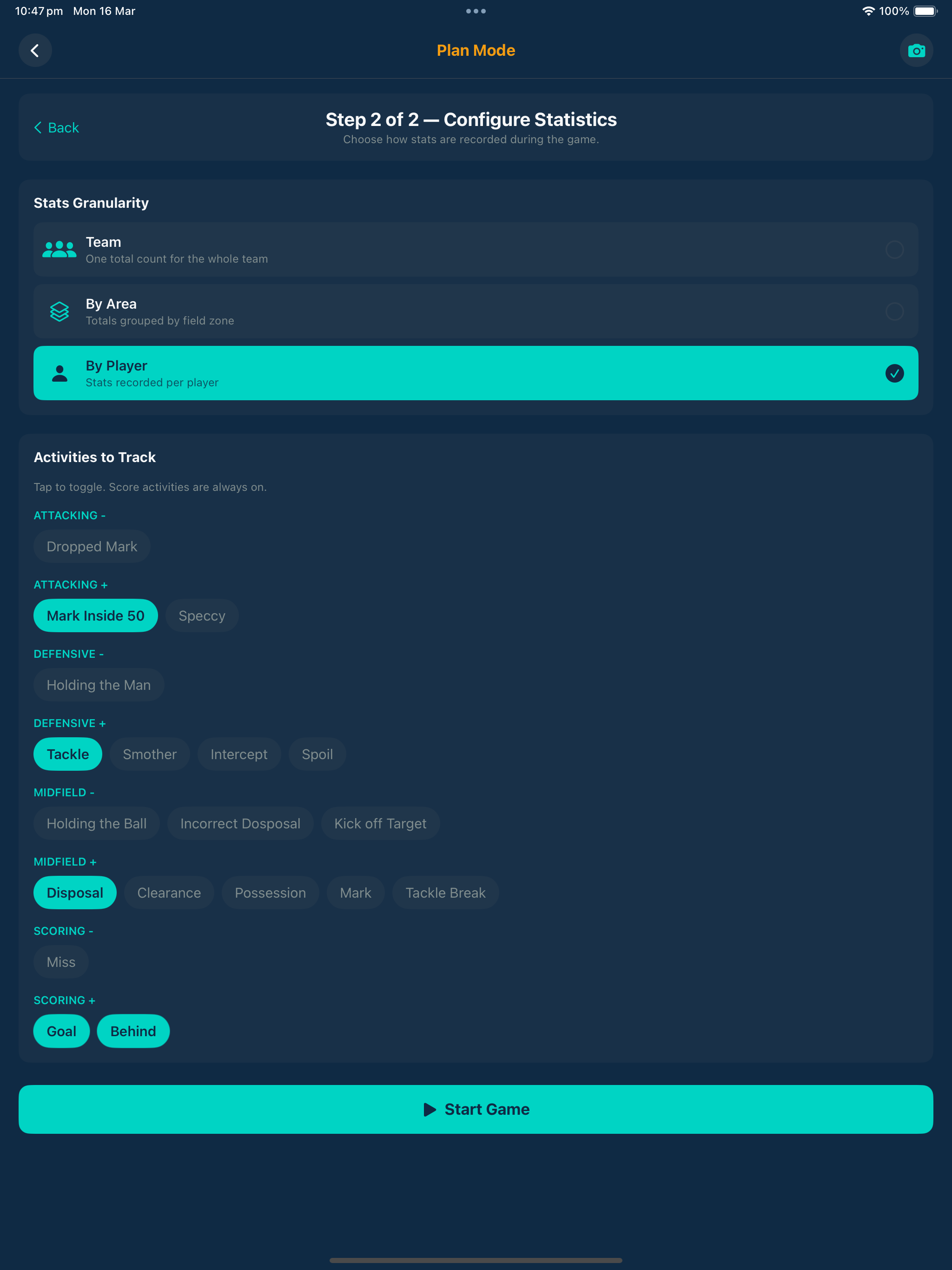
  • Plan Mode, step 2: configure the statistics you want to record for the game
  • Then score the game on the same iPad
iPad Plan Mode, step 1 of 2, Plan Your Lineup, showing on-field positions and the interchange
Step 1: plan your lineup.
iPad Plan Mode, step 2 of 2, Configure Statistics
Step 2: configure the statistics.

Set Up Faster, Record Hands-Free

Bring your squad in from a spreadsheet, and call stats out loud on game day.

Free

Import your squad from a PlayHQ export

Import a team from a spreadsheet in .xlsx or .csv format, such as an export from PlayHQ, instead of typing each player in by hand.

Premium

Record stats by voice

Call stats out loud instead of tapping them in. Voice stat recording works for team sports and needs iOS 26 or later.

Built for grassroots coaches. Designed to grow with you.

The essentials are free. Premium takes your team's development further.

Record Every Game. Attribute Every Action.

One-tap scoring with sport-specific rules. Every action is timestamped and attributed to the player who made it — whether you're recording alone on the sideline or parents are recording alongside you.

  • 100+ sport-specific activities
  • Activity timeline per player
  • Full offline functionality
Live game scoring interface showing player stat attribution

Post-Game: Know What to Work On Next

The Triage Dashboard aggregates player reflections into actionable training priorities. No more guessing what the team needs. The data — from both stats and player feedback — tells you exactly what to address at Tuesday's session.

  • Team-wide struggle patterns
  • Individual player flags
  • Weekly AI training recommendations (ScorX Premium)
Team triage dashboard on iPad with Current Game, Season View and Trends tabs, data coverage and player status

Complete Game History. Season After Season.

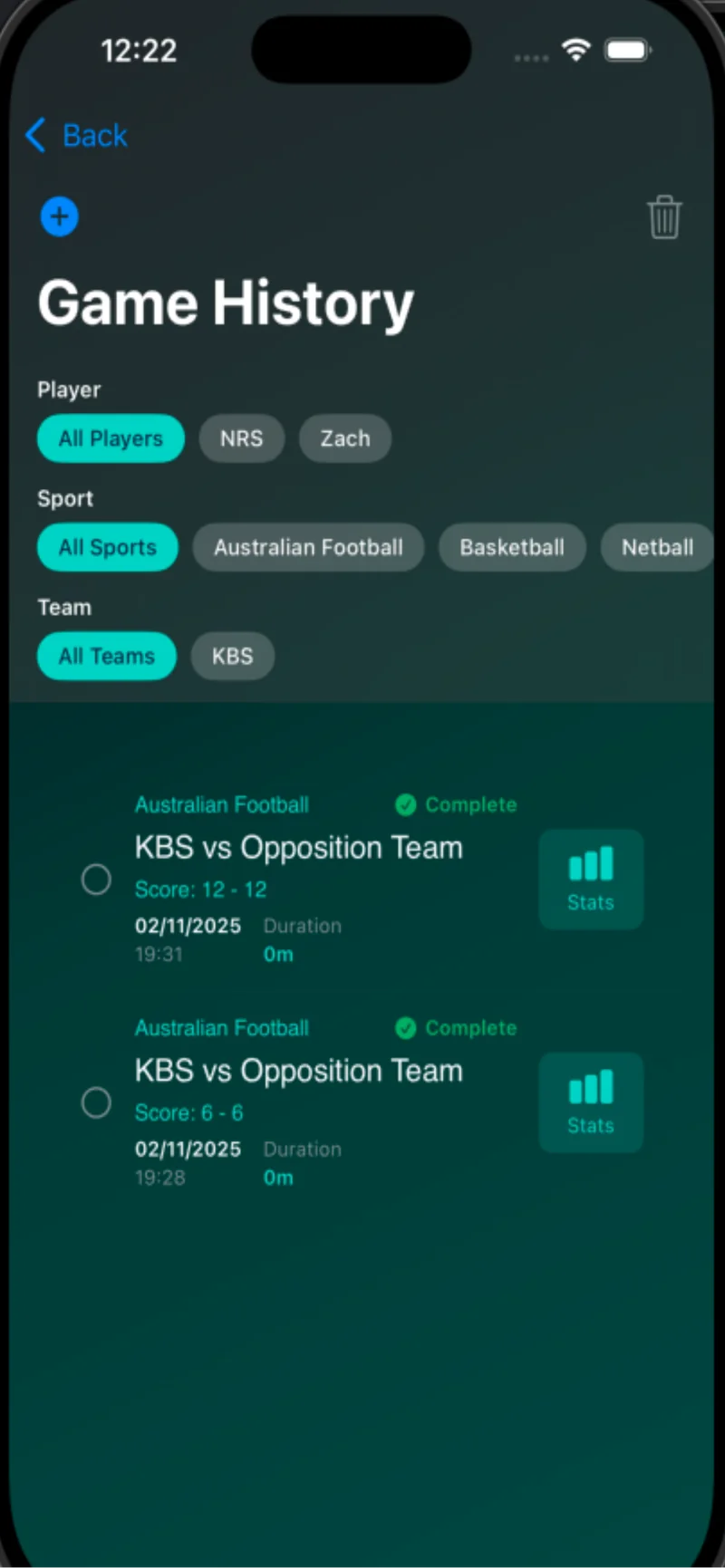
Every game is archived automatically. Search by player, date, or sport. Track how individuals and teams develop across the full season — and carry that history forward into the next.

  • Automatic game archiving (up to 20 saved games on Free)
  • Season-long stat totals
  • iCloud sync across devices (Premium)
Game history archive showing past games with stats summary

ScorX Premium

ScorX Premium for coaches

The free tools, including the post-game triage dashboard, show what happened on Saturday. Premium adds weekly AI training recommendations built from your team's match data and player reflections, and lifts the team, player and saved game limits.

AI Training Recommendations

Weekly focus grounded in your team's last game

Voice stat recording

Team sports, iOS 26 or later

A$4.99/month or A$49.99/year

30-day free trial, no card required.

See Premium pricing

Coaches FAQ

Is ScorX free for coaches?

Yes. ScorX Free costs nothing and needs no credit card. It includes live scoring, match invitations, rotations and playing time, the post-game triage dashboard, plays, drills, Training Sessions, drill assignment and team results, and iPad Team Mode. Free covers up to 5 teams, 25 players in total and 20 saved games, and ScorX Premium removes those limits.

What are Match Invitations and how do they work?

Match Invitations let coaches send a pre-game notification directly to each player's family before game day. Parents accept the invite, confirm attendance, and are set up to record their child's stats during the game. The coach sees the full team stat view in real time. It turns a single-person chore into a team effort.

How does distributed stat recording work?

When a coach sends match invitations, each parent records their own child's stats from within the app during the game. The coach sees an aggregated team view updated in real time. This removes the bottleneck of one person trying to track 15 players simultaneously.

What is the Post-Game Triage Dashboard?

After each game, players submit a structured self-reflection covering what went well and what to improve. The Triage Dashboard aggregates these submissions across the whole roster and surfaces the most common struggle areas as a ranked list, ready for your next training session. It also shows how many players have submitted so you can prompt stragglers. The dashboard is free.

What does Perception vs Reality analysis show me?

Perception vs Reality compares each player's self-assessed performance against their actual recorded statistics. It surfaces overconfidence (a player thinks they played well but the data disagrees), underconfidence (a player undervalues a genuine strength), and coaching blind spots. It makes development conversations evidence-based instead of opinion-based.

How many teams and players can I manage?

ScorX Free covers up to 5 teams, 25 players in total and 20 saved games. The 20 games are a total, not a monthly allowance, so at the cap you can't save a new game until you delete one or upgrade to ScorX Premium. Premium has no limit on teams, players or saved games.

How do I plan training and test my squad?

In the Train tools you can build plays and drills, put them into Training Sessions and run a session with beep pacing. You can also assign a drill or fitness test to your squad and see the team results. All of this is free. The Beep Test, 800m time trial and 2km time trial are free run drills, and the full run drill library with sprint and interval drills is part of ScorX Premium.

Can I import my squad from a spreadsheet?

Yes. Team import accepts a spreadsheet in .xlsx or .csv format, such as a PlayHQ export, so you don't have to type each player in by hand. It is free.

Can I record stats by voice?

Yes, with ScorX Premium. Voice stat recording works for team sports and needs iOS 26 or later.

Does ScorX work on iPad?

Yes. iPad Team Mode is free. It includes a magnet board and lineup planning, and Plan Mode takes you through planning your lineup and configuring the statistics you want to record.

What does ScorX Premium add for coaches?

ScorX Premium adds weekly AI training recommendations, generated from your team's match statistics and player self-assessments. It identifies the specific areas where your team struggled and suggests targeted training priorities, not generic drills. Premium also adds voice stat recording, the full run drill library, PDF and CSV export, iCloud sync, and removes the limits on teams, players and saved games. Everything else in Train, including benchmarking, is free. It costs A$4.99 a month or A$49.99 a year, with a 30-day free trial and no card required.

Grow Your Game — Starting Today.

Download free and run your first game in minutes. Ready to take your team's development further? Try Premium free for 30 days.

Download Free Explore Premium

Latest from the Blog

Coaching insights and development guides for getting the most out of your junior squad.

View all posts